Guide by
yuh25 (
PM )
It took me ages to find a guide on how to make a custom psp but I couldn’t find one so to save people some time he is my guide.
Things you will need (if you don’t want to spend much):
- PSP slim
- PSP slim original battery
- Spare PSP slim battery
- A memory stick pro duo 4-1GB(my 4 GB worked I don’t know if any others will)
Thing you will need if you don’t care how much you spend:
- PSP slim
- 12.50 USD for a hybrid battery click here
- Memory stick pro duo
As you may already know there are three steps:
- Making the magic memory stick
- Making the Pandora’s battery
- Putting custom firmware on the psp slim
STEP 1 - Making MMS (magic memory stick):
Before doing this download official firmware 3.71-3.90 (3.90 recommended because it has skype and go messenger)
here.
Now after downloading the firmware
Download this:
rains simple mms maker
This is the
easiest way to make MMS
After downloading run the program it should come up with a menu
1. There should be a list of options with what firmware you want to install select the firmware that you have downloaded
2. optional If you have files on the memory stick and want to
format to make it more easier to put games and stuff select
[backup] and choose where you are going to place the backup.
Backing up the memory stick will take longer if you choose to do this step.
3. Then click
[MAKE MMS]
After a while this mms should be done. Close the program and get you battery.
*The memory stick has not been changed it had just had a couple of files put on it so the memory stick will still work as a MMS and a storage place.
STEP 2 - Making Pandora’s battery. (If you have brought a hybrid battery hold the bottom until the lights start to flash, it takes a while).
For making the battery, don’t make this same mistake I made !!DON'T CUT THE 5TH PIN!!
Now for opening the battery I used a sharpener blade but you can use anything sharp.
Once open you should see a chip lift that (don’t worry about the power connectors snapping it can take allot of bending)after lifting it should look like this:
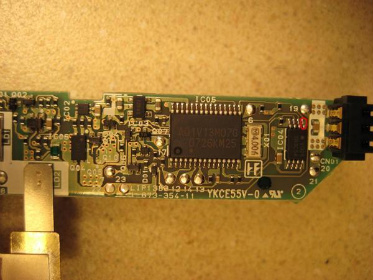
Ignore the red circle.(I don’t know what it is you could try but I don’t recommend)now above the red circle there’s a 19 cut the wire under the 19 cut anywhere under it now you should have a Pandora’s battery. to test when the battery it inserted into the psp the power will turn on by itself. If not you will have to buy the hybrid battery (link is above).
STEP 3 - Installing custom firmware.
First insert the MMS then insert the battery while holding L (If you don’t it will just stay on until you take the battery out).
After a short while lights should flash, first the memory stick light (orange) then the wlan light (green). Then a menu should pop up (looks a bit like MS-DOS)press X for custom firmware 3.XX or O for official 3.XX firmware. Then wait for the firmware to be installed, you will know when it is done when the lights have stopped flashing or when it says press x to shutdown psp.
If the battery falls out do this step again.
Have fun with custom firmware!
NOTE:
- You cannot use the universal remote on a slim.
- Pressing select will come up with a menu
- While powering up hold R to enter recovery mode
 20/09/2008
23
20/09/2008
23
Join MyPSP to vote for your favourite story!
Tags:
CFW
Custom
firmware
lite
PSP
Slim
More Info:
PSP Slim & Lite
Related News:
Related Videos:
-

The Gadget Show: PSP Go Exclusive Review
-

How To Install PSPTube
-
360 chat pad on psp
-

Dude, Get Your Own
-

Tour Gaming with Breaking Benjamin
-
![PSP Slim & Lite Review [part 6]](img/video/P9WHTJ9J.jpg)
PSP Slim & Lite Review [part 6]